Posts

Unity Shader: Toon Water Shader
Image
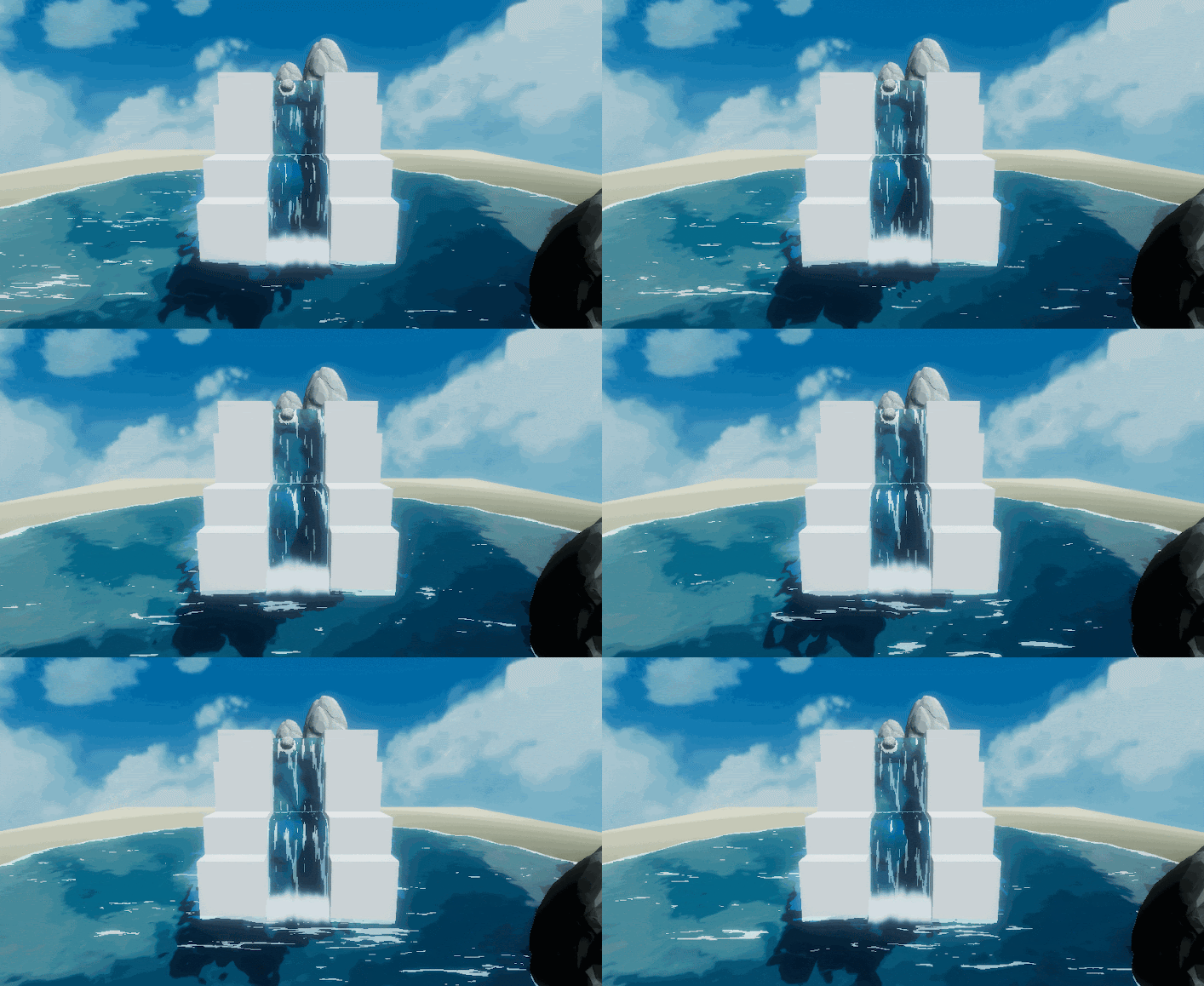
  I'm a huge fan of Studio Ghibli movies and I've always wanted to replicate their visual style in a video game. In this post I'll tell you how I emulate as close as possible, the look of the water we all love in Studio Ghibli movies. Before we continue, I'd like to thank Roystan and Harry Alisavakis for their tutorials on toon water  and grab pass shaders which gave me the kickstart to develop my own water shader. Features I wanted my shader to be quick and easy to insert in a scene, so all you need is just a flat plane that will be our water surface and some kind of terrain with depth to contain our water. The shader will have the following features: animated vertex displacement animated fake refraction selective planar reflection animated normal maps animated foam How it works We can subdivide the shader into 5 steps: Vertex displacement - use a simple vertex displacement map to generate waves moving the vertices of the flat plane along the y-axis. Depth based w...

ZBrush: When a programmer tries to be an artist ;-)

Image
I'm huge fan of the art of Jim Lee , Jim Cheung , and Joe "Mad" Madureira, the latter being my biggest insipiration! In 2018 my girlfriend bought me for my birthday a Wacom Intuos tablet bundled with ZBrush Core so I've decided to learn this amazing software. I have no background in art,  so I've bought myself a really good book called Anatomy for 3D artists published by 3D Total to start learning how to scult. It's a good book because beside having some great anatomy images, it shows the bones and the muscles underneath the skin and it's great to understand how our body takes form. I've decided to concentrate my efforts first on the head and the facial features. Following are some images of my "progress" at sculpting the human head.

Developing my own little 3D Engine

Image
Developing my own little 3D engine is a dream that I had since I've played for the first time Quake II, my first first person shooter. Here's a quick video of what I came up with until now. And here the list of the incredible features my engine currently has 😂: Developed in C++ Uses just four dependencies: SDL 2.0 to get an OpenGL context, GLAD to load OpenGL extensions, GLM math library and SOIL to load textures. Runs on both Windows and Linux Arcball Camera OBB collision system Ray picking objectes selection Directional Light Directional Light Shadow Mapping Custom OBJ file parser

GLSL Shader in Maya Part 2: Textures

Image
Welcome to a new chapter in our experiment to make Maya work as a shader editor. I'm going to show you a simple shader to load textures using the second method I've shown you in the previous article. The code is pretty much self explanatory, look at the comments to find out more. basic_texture.ogsfx  1 2 3 4 5 6 7 8 9 10 11 12 13 14 15 16 17 18 19 20 21 22 23 24 25 26 27 28 29 30 31 32 33 34 35 36 37 38 39 40 41 42 43 44 45 46 47 48 49 50 51 52 53 // Tell included shaders to use OGSFX semantics and streams: #define OGSFX 1 //########################### UNIFORMS ########################### // Uniform parameter handling // Loads the uniforms from all shader stage files #define HIDE_OGSFX_UNIFORMS 0 #define HIDE_OGSFX_STREAMS 1 #define HIDE_OGSFX_CODE 1 #include "basic_texture.glslv" #include "basic_texture.glslf" //########################### ATTRIBUTES ########################### // Input stream handling: // Loads the attrib...

GLSL Shader in Maya Part 1

Image
Maya to act like an (expensive) shader editor There aren't many shader editors out there, not as many as it used to be in the early 2000s when AMD had RenderMonkey and Nvidia had FX Composer. They were pretty good softwares in my own humble opinion and it's a pity they have been discontinued. These days we have Shadertoy but to be honest I prefer native applications, yes I'm old school! I've always known that Maya supports HLSL and GLSL shaders in Viewport 2.0 so I've started to think that it would be really cool to use it like a shader editor. But it's not as simple as I would have expected, the documentation around the net is pretty sparse so it's a matter of trials and errors. Why GLSL and not HLSL? I have nothing against HLSL, in fact I use it extensively in Unity (well to be precise I use Cg which is NVidia version of HLSL). I've decided to go with GLSL simply because is more portable and I like to use Maya on Linux for my person...

Unity Shader: Spherical Mask Dissolve

Image
Spherical Mask Dissolve Shader This shader is the combination of the two previous shader, the Dissolve shader and the Spherical Mask shader to get a "reveal world" kind of shader, something like you have experienced in games like Beyond Eyes . If you remember, in the Dissolve shader we used a  _DissolveTexture  to get a dissolve_value . Because the dissolve_value is in the range of (0,1) we needed an _Amount value to be subtracted from the dissolve_value so that the clip() function can discard all the pixels that has a dissolve_value < 0. In the Spherical Mask Dissolve shader we don't have an _Amount value, instead we have to compute it! To compute the _Amount value (that in this shader is called amount) , we use the technique showed in the Spherical Mask Shader. In the Spherical Mask Shader we checked if a pixel was inside of the player radius of action, if it was we color it, if it wasn't we let it in grayscale. Here we use the same logic to define ...

Unity Shader: Spherical Mask

Image
I'm a big fan of Beyond Eyes game and the way the world takes form while the little girl walks around. Last time we looked at the dissolve effect this time we take a look at Spherical Mask effect. The two effects combined together will let us create a custom shader that emulates the Beyond Eyes effect. Let's begin! Spherical Mask The image above is pretty self explanatory, we have a player object that has a radius of action, every pixels inside its radius of action will be colored while the others stay in grayscale. Let's begin with adding two input propeties to our shader: 1 2 3 4 5 6 7 8 9 Properties { //...other shader properties //Spherical Mask properties _PlayerPosition( "Player Position" , Vector) = ( 0 , 0 , 0 , 0 ) _Radius( "Mask Radius" , Range( 0 , 100 )) = 0 _Softness( "Mask Softness" , Range( 0 , 100 )) = 0 } _PlayerPosition passes the player postion to the shader  _Radius is the player radius ...

Unity Shader: Dissolve Shader

Image
In this article I'd like to show you a quick and easy way to implement the dissolve effect. Mind you, the code is not optimized to make it easier (hopefully) to understand. Let's begin! The Dissolve Texture First of all we need a dissolve texture and we can generate it ourselves using Photoshop Cloud filter. Here's mine: The Shader Add a new Standard Surface Shader in Unity. Add two new input properties to our shader: 1 2 3 4 5 6 7 8 Properties { //...Other shader properties //Dissolve Shader Properties _DissolveTexture ( "Dissolve Texture" , 2D ) = "white" {} _Amount( "Dissolve Amount" , Range( 0 , 1 )) = 0 } _DissolveTexture is where we put our dissolve texture _Amount represents the progress of dissolving our object (0 = visible, 1 = disappeared) In the surf function is where the magic happens! We get the  dissolve_value by sampling the color of our _DissolveTexture using the...

Zbrush: My first attempt at sculpting a super villain mask

Image
Yeah I'm a programmer but I'd love to be a 3D Artist 😁 My girlfriend Giulia bought me a Wacom Intuos tablet bundled with ZBrush Core and in my spare time I've started learning this amazing software. Here's my first attempt at sculpting a super villain mask 😃 Please enjoy!

Spherical Coordinates

Image
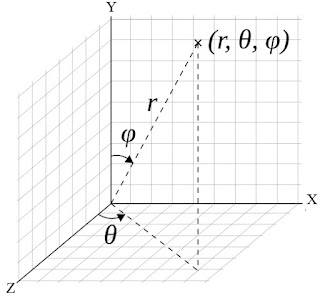
A spherical coordinate system is a coordinate system where the position of a point in 3D space is specified by three numbers: a radial distance r an azimuthal angle  θ ( theta ) a polar angle  φ ( phi ) Spherical coordinates comes in handy to implement an Arcball Camera . Imagine to have a virtual ball behind your screen, by clicking with your mouse you pinch the ball and by dragging the mouse you make the ball spin around its center. We can map the mouse x coordinates to be the θ angle and the mouse y coordinates to be the φ angle. We also assume that our virtual ball is a unit sphere so the radial distance is always 1. The problem is that we can specify the position of our camera only using cartesian coordinates so how do we convert spherical coordinates to cartesian coordinates? Polar Coordinates Polar coordinates are like spherical coordinates but in 2D.  We can specify the position of a point using two numbers: a radial ...

Android OpenGL ES 2.0 OBJ Loader with Lambert Shading

Image
For this experiment I've developed my own OBJ parser in Java which support parsing of vertex positions, normals, texture coordinates and indices to remove duplicated vertices before uploading them to the vertex buffer object. To test normals I've also implemented a simple lambert lighting system using OpenGL ES 2.0 GLSL shader language.

80s sci-fi soundtrack song!

Image
I was a child of the 80s, born and raised and that incredible decade. I'm mainly a guitar player and death metal is what I hear and compose the most but I'm a sucker for 80s sci-fi-cyberpunk movie soundtracks. Recently I've tried this free VST Synth called Synth1  and I've started to experiments with its settings! It's a great plug-in if you love those 80s synth sounds! So to cut a long story short, I've put on "The Terminator" on mute and played along and this what has come out! Please enjoy!